
welcome
 |
Earning world

Sunday, December 26, 2010
Increase your subscriber count using feedburner redirection
Even if you burn your Blogger feed to Feedburner, some percentage of your visitors may still be reading the Blogger feed. This could happen if they had provided your blog URL (instead of your feedburner feed) to their feed reader and their feed reader auto-discovered Blogger feed. The side effect of this is that your subscriber count will not be accurate. The first useful development of Google buying Feedburner happens to be the new "Feed redirection" feature. Using this, you can redirect your Blogger feed to Feedburner feed. You can do this by going to Settings->Site Feed and providing your feedburner feed URL for redirection (as shown below).


20 Essential Blog Directories to Submit Your Blog- A must
So you have created your blog and now you want to to become famous and increase the number of visitors to your blog page . Thats where blog directories come into handy.These are the directories which accept your blog page URL and increase the number of inbound links to your blog and obviously bringing more exposure to it .Most of them are free sites and dont charge money for that .
Here are 20 popular directories to which you must sumbit your blog to :.
1. Best of the Web Blog Search Best of the Web’s Blog Directory is very selective and only lists aged and valuable blogs. A link from here is valuablable and well deserved.
2. EatonWeb Blog Directory is a real diamond with many inbound links and a blog rating system. You may have to pay a fee for your blog to be reviewed, but like Yahoo, the review fee is well worth the few dollars.
3. Blog Hub offers a drop down category and member blog list. With its “new blogger” list and hot topics, Blog Hub is a great directory to list your site.
4. Upon visiting Bloggernity, you find a crisp, clean, and easy to navigate site. Scrolling down, you find the new blogs. As there is little advertising on the home page, it is pleasant to the eye of the reader as well.
5. Blogarama has an impressive listing of over 65,000 blogs. The site is well designed and follows the same content categories as many other sites.
6. One of the most selective Blog Directories on the web (and Wordpress powered), Blog Search Engine is owned by Performancing’s parent company and serves search results powered by IceRocket.
7. Blog Catalog features a vast directory of categories, from academic to writing, while offering the ability to search by country, language, or user. It has a no frills design, but offers convenient member access through simple blog registration.
8. Globe of Blogs has too many features to list. In order to be listed on the site, the blog must not be commercial. The site may appear to be busy, but I like the features of being able to search by title, author, or subject. Narrowing the search becomes easier on this blog.
9. The ultimate directory of British blogs connotes all things British. It is not directed by location, but by the culture! It is asked that bloggers be genuinely “britished.” Being listed in this blog reaches readers all the way across the pond!
10. Blog Universe is the perfect place to promote your video or podcast themed blog. Its layout is easy to navigate. Although the content is limited, it is an all around good directory site worthy of submission.
11. Bigger Blogs is a relatively new blog directory with only a few blogs registered. The blog is intertwined with a business directory. The blog section is difficult to find, and it is located through a link on the right side of the business directory page. However, the benefit is that the earlier you are accepted on a blog directory, the more exposure your blog will obtain. In addition, a back link is indeed a back link, so this can help with your search engine placement.
12. Bloggeries has the best categories and subcategories home page on the internet. The layout is clear and concise, and readers are able to find what they are looking for in a snap!
13. Bloggapedia has an interesting and eye catching homepage. Readers are easily connected to the top blogs and newest posts. Innovative categories and a colorful design make this blog directory a hit.
14. Spillbean is a well-designed blog directory site with categories such as health, society, internet, and personal. The site is aesthetically pleasing, but there are not many listings yet.
15. Blogging Fusion is a blog with over sixty categories. These categories include photo blogs and family focused blogs. Blogging Fusion has an good amount of blog listings within the directory, and it also has visitor stats available.
16. Blogflux is not only a tool for bloggers, but a directory that has the listings in alphabetic order. The blog listings are organized and clear. It is definitely an effective blog directory in which to be listed.
17. The blogs on the top listings of Bloglisting are fun, colourful, and catch the attention of the reader. Bloglisting displays the page ranking blogs, which is a helpful tool when determining with whom you want to exchange links.
18. Blogio may be a small blog directory with few listings, but it worthy of a submission. Despite its small size, there are quality blogs and a solid ability to search on this site.
19. Blog Explosion claims to be the largest blog promoter on the internet. They have a vast directory but do not seem to have direct links. However, the listing in the directory can still show up in SERP’s, so keep this in mind.
20. Super Blog Directory is a great site that offers tools to posters that others do not. You can see the latest submitted links and blogs on the site, which is a perk that draws traffic into the directory.
These blog lists are really imortant for your blog and growing business.
There are countless more directories at your disposal, which are always just a Google, Yahoo, Live or Ask.com search away.
How to disable Auto complete option in Internet Explorer?

Auto Complete lists possible matches from entries you’ve typed before on the website on a system.Auto Complete is supposed to be a very helpful feature , but sometimes saving usernames and passwords are not required .To turn of Auto complete and Caching of Passwords:
1.Click on Tools > Internet Options >Content > Auto Complete .
2.Uncheck User names and passwords on forms.
Internet Explorer Tips and Tricks
Never loose an interesting site

If you remember visiting a site a week or two ago that you forgot to add to your Favorites list ,you can still find it .The history folder maintains the list of all the sites that you visited for a set number of days.
1.Click Tools > Internet Options .
2.Under the General tab set the days to keep pages in History .You can enter any number between 0 and 999.

If you remember visiting a site a week or two ago that you forgot to add to your Favorites list ,you can still find it .The history folder maintains the list of all the sites that you visited for a set number of days.
1.Click Tools > Internet Options .
2.Under the General tab set the days to keep pages in History .You can enter any number between 0 and 999.
Find sites with auto complete
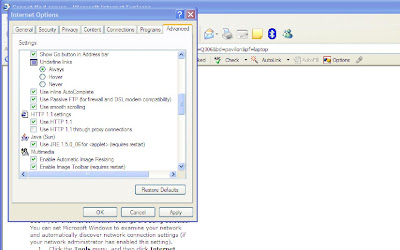
Whenever you begin to type a URL in the Address Box it tries to find the recently visited page that matches what you are typing .If Explorer finds a match it automatically fills in the rest of the address for you .This is not only convenient it can also be useful if you remember only a part of the Internet address.You can turn this feature On or Off from
1.Tools > Internet Options > Advanced
2.Scroll down to ‘Use inline Auto Complete for WebAddresses’ Toggle this On or Off.

Whenever you begin to type a URL in the Address Box it tries to find the recently visited page that matches what you are typing .If Explorer finds a match it automatically fills in the rest of the address for you .This is not only convenient it can also be useful if you remember only a part of the Internet address.You can turn this feature On or Off from
1.Tools > Internet Options > Advanced
2.Scroll down to ‘Use inline Auto Complete for WebAddresses’ Toggle this On or Off.
Use the Cache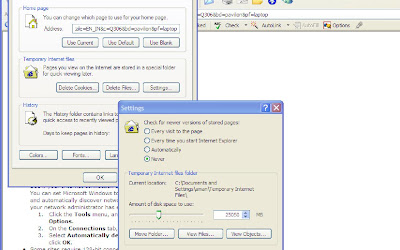
For Faster display of Previously viewed pages
Click on
1.Tools > Internet Options > Settings
2.To increase the drive space for temporary pages ,move the slider to the right .
3.To prevent updates to cached pages ,Click Never .The Browser always loads the page it has stored in the cache instead of downloading a new one .

For Faster display of Previously viewed pages
Click on
1.Tools > Internet Options > Settings
2.To increase the drive space for temporary pages ,move the slider to the right .
3.To prevent updates to cached pages ,Click Never .The Browser always loads the page it has stored in the cache instead of downloading a new one .
What languages does Google Adsense supports?

Google AdSense supports publishers in several different languages. Applications for participation in the program can be for sites with content primarily in:
Chinese (simplified)
Italian
Chinese (traditional)
Japanese
Croatian
Korean
Czech
Norwegian
Danish
Polish
Dutch
Portuguese
English
Romanian
Finnish
Russian
French
Slovak
German
Spanish
Greek
Swedish
Hebrew
Turkish
Hungarian
In addition, AdSense for search is available in Arabic and Bulgarian. These languages are not supported for AdSense for content pages.
You can select your site's primary language during the application process. If you're approved, AdSense will serve relevant ads to your pages in the appropriate language, even if your site contains multiple supported languages.
Please also be aware that placing the AdSense code on pages with content primarily in an unsupported language is not permitted by the AdSense program policies.
Chinese (simplified)
Italian
Chinese (traditional)
Japanese
Croatian
Korean
Czech
Norwegian
Danish
Polish
Dutch
Portuguese
English
Romanian
Finnish
Russian
French
Slovak
German
Spanish
Greek
Swedish
Hebrew
Turkish
Hungarian
In addition, AdSense for search is available in Arabic and Bulgarian. These languages are not supported for AdSense for content pages.
You can select your site's primary language during the application process. If you're approved, AdSense will serve relevant ads to your pages in the appropriate language, even if your site contains multiple supported languages.
Please also be aware that placing the AdSense code on pages with content primarily in an unsupported language is not permitted by the AdSense program policies.
What is Google Adsense?

Google AdSense is a fast and easy way for website publishers of all sizes to display relevant, unobtrusive Google ads on their website's content pages and earn money. Because the ads are related to what your users are looking for on your site, you'll finally have a way to both monetize and enhance your content pages.
It's also a way for web site publishers to provide Google search to their site users, and to earn money by displaying Google ads on the search results pages.
The program is free, and combines pay-per-click and pay-per-impression advertising - meaning you get paid for valid clicks on the ads on your site or search results pages as well as impressions on your content pages. So go ahead and try this program.
If you comply with Google Adsense's program policies, just complete their online application and select either or both of AdSense for content pages and AdSense for search. One application gets you approved for both AdSense and AdSense for search - you can decide to use any combination of these products on your pages.
Google Adsense guys review your application and follow up with an email within 2-3 days. If you are accepted into the program, you can log in to your new account and get the HTML code to insert into your web pages.
Google Adsense guys review your application and follow up with an email within 2-3 days. If you are accepted into the program, you can log in to your new account and get the HTML code to insert into your web pages.
Keep in mind that participation in AdSense requires you to have a website. If you don't have one, you can sign up for a free blog at www.blogger.com or create and publish useful, attractive web pages using Google Page Creator, at pages.google.com.
Internet Explorer 7 Shortcuts
IE 7 Keyboard Shortcuts
Open links in a new tab in background [Ctrl]+Left click
Open links in a new Tab in foreground [Ctrl]+[Shift]+Left Click
Open a new Tab in the foreground [Ctrl] +[T]
Open a new Tab from the Address bar [Alt]+Enter
Open a new Tab from the search box [Alt] +Enter
Open quick tabs [Ctrl]+[Q]
Switch between tabs [Ctrl]+[Tab]
Switch to a specific Tab number [Ctrl] +[n]
Switch to the last Tab [Ctrl]+[W]
Close all tabs [Alt]+[F4]
Close other tabs [Ctrl]+[Alt]+[F4]
Mouse shortcuts for tabbed browsing
Open a link in the background tab Click the middle mouse button on a link
Open a new tab Double Click the empty space to the right of the last tab
Close the tab Click the middle mouse button on the tab
Open links in a new tab in background [Ctrl]+Left click
Open links in a new Tab in foreground [Ctrl]+[Shift]+Left Click
Open a new Tab in the foreground [Ctrl] +[T]
Open a new Tab from the Address bar [Alt]+Enter
Open a new Tab from the search box [Alt] +Enter
Open quick tabs [Ctrl]+[Q]
Switch between tabs [Ctrl]+[Tab]
Switch to a specific Tab number [Ctrl] +[n]
Switch to the last Tab [Ctrl]+[W]
Close all tabs [Alt]+[F4]
Close other tabs [Ctrl]+[Alt]+[F4]
Mouse shortcuts for tabbed browsing
Open a link in the background tab Click the middle mouse button on a link
Open a new tab Double Click the empty space to the right of the last tab
Close the tab Click the middle mouse button on the tab
How to boost up your Modem Speed!!

Even if your modem is working well, the baud rate of your COM port might not allow you to reach top-speeds. To improve the port's speed:
For Windows XP
1. Click Start > Control Panel > System > Hardware > Device Manager
2. Under the Device Manager tab, click the '+' sign next to Ports (COM & LPT).
3. Select the port your modem uses (usually COM2), click Properties, and on the Port Settings tab set the Bits per second to 115200 bps.
You will find considerable improvement in your browsing speed!!
How to Create Keyboard shortcuts
You can automate just about any point and click operation you perform with the mouse .Here’s a variety of ways to make Keyboard shortcuts.
Windows lets you assign a keyboard command to any shortcut icon,.Just right click the icon in question ,click Properties ,and click in the ‘shortcut’ key field.Press the keyboard combo you want to assign to launch the shortcut;It must include one standard character plus two or three of, ,or .
To make more robust arrangements try the appropriately named freeware app keyboard Shortcuts(http://www.soft45.com/details%20/Keyboard-Shortcuts-09912.htm) .With such shortcuts you can launch any file ,perform system commands (such as logging off and shutting out),or open any URL in a browser.One shortcut can even perform several of these actions,simultaneously or in sequence .
For even more complex shortcuts ,get a macro recorder that can capture detailed steps and repeat them on command.The workspace Macro Program (www.tethyssolutions.com/product.htm) can capture anything you type ,as well as mouse movements and clicks.
Just click New to record a macro ,and click Stop after you have done all your typing and mousing .If you want to assign keyboard shortcuts to your macros,you will need a separate program .
Windows lets you assign a keyboard command to any shortcut icon,.Just right click the icon in question ,click Properties ,and click in the ‘shortcut’ key field.Press the keyboard combo you want to assign to launch the shortcut;It must include one standard character plus two or three of
To make more robust arrangements try the appropriately named freeware app keyboard Shortcuts(http://www.soft45.com/details%20/Keyboard-Shortcuts-09912.htm) .With such shortcuts you can launch any file ,perform system commands (such as logging off and shutting out),or open any URL in a browser.One shortcut can even perform several of these actions,simultaneously or in sequence .
For even more complex shortcuts ,get a macro recorder that can capture detailed steps and repeat them on command.The workspace Macro Program (www.tethyssolutions.com/product.htm) can capture anything you type ,as well as mouse movements and clicks.
Just click New to record a macro ,and click Stop after you have done all your typing and mousing .If you want to assign keyboard shortcuts to your macros,you will need a separate program .
How to turn on Remote Desktop in Windows Vista


In Vista , the Remote Desktop connection feature is disabled by default .If you need to access your PC from another system or vice versa , you can easily enable this feature .
To do so :
1) Right Click the "My Computer" desktop icon and click "Properties"
2) On the left pane , click the remote settings link.
3) Select "Allow Assistance connections to this computer".
4) To allow connections from any windows version , click the "Allow connections from computers running any version of Remote desktop" radio button.
5) Once done , click "Ok".
Subscribe to:
Posts (Atom)