*#06# Shows IMEI number
*#9999# Show software version
*#0001# Display RS232 serial communication parameter setup
*#8999*228# Display battery capacity and temperature / voltage
*#8999*523# Adjust display contrast
*#8999*636# Display storage capacity
*#8999*778# Display SIM card information
*#8999*324# The network checkout (engineering model)
*#8999*289# Ringtone test
*#8999*364# Display Watchdog state
*#8999*427# WATCHDOG signal route setup
*#8999*842# Vibrate test
*#8999*782# Show date and alarm clock
*#8999*246# Show the memory capacity
*#8999*786# The display during warning
*#8999*837# Samsung hardware version
*#8999*377# Software error LOG (wrong display of EEPROM)
*#8999*638# Show network information
welcome
 |
Earning world

Showing posts with label Mobile. Show all posts
Showing posts with label Mobile. Show all posts
Sunday, April 10, 2011

Monday, March 21, 2011
All Nokia Codes
These Nokia codes will work on most Nokia Mobile Phones, however we accept no responsibility of any kind for damage done to your phone whilst trying these codes.
Code Function
*3370# Activate Enhanced Full Rate Codec (EFR) - Your phone uses the best sound quality but talk time is reduced my approx. 5%
#3370# Deactivate Enhanced Full Rate Codec (EFR)
*#4720# Activate Half Rate Codec - Your phone uses a lower quality sound but you should gain approx 30% more Talk Time
*#4720# Deactivate Half Rate Codec
*#0000# Displays your phones software version, 1st Line : Software Version, 2nd Line : Software Release Date, 3rd Line : Compression Type
*#9999# Phones software version if *#0000# does not work
*#06# For checking the International Mobile Equipment Identity (IMEI Number)
#pw+1234567890+1# Provider Lock Status. (use the "*" button to obtain the "p,w" and "+" symbols)
#pw+1234567890+2# Network Lock Status. (use the "*" button to obtain the "p,w" and "+" symbols)
#pw+1234567890+3# Country Lock Status. (use the "*" button to obtain the "p,w" and "+" symbols)
#pw+1234567890+4# SIM Card Lock Status. (use the "*" button to obtain the "p,w" and "+" symbols)
*#147# This lets you know who called you last (Only vodofone)
*#1471# Last call (Only vodofone)
*#21# Allows you to check the number that "All Calls" are diverted to
*#2640# Displays security code in use
*#30# Lets you see the private number
*#43# Allows you to check the "Call Waiting" status of your phone.
*#61# Allows you to check the number that "On No Reply" calls are diverted to
*#62# Allows you to check the number that "Divert If Unreachable (no service)" calls are diverted to
*#67# Allows you to check the number that "On Busy Calls" are diverted to
*#67705646# Removes operator logo on 3310 & 3330
*#73# Reset phone timers and game scores
*#746025625# (or: *#SIM0CLOCK#) Displays the SIM Clock status, if your phone supports this power saving feature "SIM Clock Stop Allowed", it means you will get the best standby time possible
Use mobile cam as a Webcam
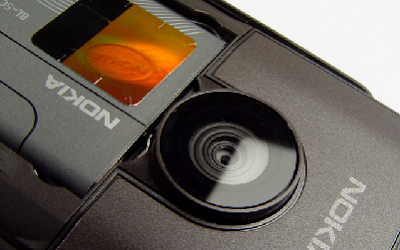
If Guys don’t have a Web Camera and Still want to chat with friends on Yahoo and Skype then have a look at what we have got for you.
If you have a s60 Nokia Cell Phone with Camera you can use it like your Web Camera. The SmartCAM Application connect the PC to your mobile and it will Synchronize your Mobile with your PC so you can use your Cell Phone Camera as a Web Camera and have a Video Conferencing.
Basic features
1. SmartCAM is basically developed for the Symbian series 60 Phones with Blue tooth connectivity using which the integration of your phone cam with your PC is made easy.
3. Connect the phone to PC via Blue tooth using the SmartCAM Application Interface.
4. Once you have connected to the PC what you need to do is to synchronize the phone with your PC so that you can easily make it function as your PC Web Camera.
5. SmartCAM works very well with Skype and Yahoo Messenger where you can video chat with your friends using your Phone’s Came.
CLICK HERE TO DOWNLOAD THIS SOFTWARE
Saturday, March 19, 2011
Mobile Anti theft software
Ever thought about pounding your computer with a hammer hoping it starts moving slightly faster than the current snail’s pace?
Well we would say don’t rush for the hammer just yet; try this collection of smart utility software instead. Here are Top 10 Tools that provide all the help you need to control, tweak and manipulate the looks and functionality of Windows.
Tweak UI : Here is a utility from Microsoft which is termed as the ultimate user interface (UI) tweaker for XP. This utility lets you twist and manipulate, and sometime even override, the way your Windows interface should look. An indispensable tool that offers multiple UI tweaks under a single interface.http://www.microsoft.com/windowsxp/downloads/powertoys/xppowertoys.mspx
Google Desktop 5 : Finally if you think searching files on your computer takes an eternity, Google desktop can come to the rescue. This software does more than just search. Google Desktop indexes all of your data files — including email and instant messages — so you can find it fast. The interface includes multiple search-box configurations and an advanced search option. You can search and find your own files along with your Internet search results.
www.desktop.google.com
DoubleKiller : cluttered hard disk can really slow down your PC, and what adds to the clutter the most is duplicate files that hog space for no reason. This utility, as the name implies, brings you help on this front. It locates duplicate files on your computer and kills one, leaving you with just a single file.http://www.bigbangenterprises.de/en/doublekiller
FreeCommander : This is an easy-to-use alternative to the standard Windows file manager. Here you can find all the necessary functions to manage your data stock. The best part is that you can put this utility on a USB key — even a floppy disk if you can find one — and take it with you to control files on any PC.www.freecommander.com
Taskbar Shuffle 2.2 : So you think the Windows taskbar controls you? Here is one utility that will let you turn the tables. It lets you move the buttons for open applications anywhere you want on the taskbar, or group open documents together. And yes, it works with Windows versions all the way back to Windows 95.
www.freewebs.com/nerdcave/taskbarshuffle.htm
Defraggler : Fragmentation of the disk is another big culprit that can slow down your computer. This utility is a handy one that will help you clean up the mess. It not only defragments your hard disk but also claims to defragment individual files. If you’re not sure what needs defragging, it also provides a list of files that need it. And yes, this one is tiny enough to go on a USB drive too.
www.defraggler.com
WinDirStat : If your hard disk seems bloated and you have no idea what exactly is taking up all that much space, here is something you should look at. Short for Windows Directory Statistics, this programme presents your hard drive’s directory in multiple views, some resembling Windows Explorer — files represented by 3D boxes in full colour. One look and you’d soon know what’s taking up space.www.windirstat.info
WinPatrol 2007 : You might not even notice but there are umpteen number of useless programmes that come pre-installed with your Windows, which end up eating plenty of CPU cycles. Put Scotty, the WinPatrol mascot, to work keeping an eye on your system. Scotty will come up with warnings about new programmes that plan to run at start-up and detection of other system changes, trusted or not. It will also delay the start of programmes to improve boot-up speed in any version.http://www.winpatrol.com
Absolute Uninstaller : You might have uninstalled a particular programme, but unfortunately it still leaves a lot of junk in its wake.
One way to be sure that a programme is all gone is the absolute uninstaller. This replaces the default Add/Remove Programmes control panel in Windows, checks for extra stuff to delete after an uninstall (such as Start menu entries and useless Registry keys), and, best of all, does batch removal of multiple programmes at one time. www.glarysoft.com
Eraser : With more and more sophisticated recovery tools, it can be disastrous to get rid of an old computer without making sure the hard drive is wiped clean. This doesn’t mean just reformatting it, but actually annihilating all data by overwriting disk sectors multiple times. Open-source Eraser that fits a USB drive is a great candidate for the job. www.heidi.ie/eraser
Friday, March 11, 2011
Essential Bluetooth hacking tools
Friday, February 25, 2011
Super Bluetooth Hack
Super Bluetooth Hack 
With this java software you can connect to another mobile and ….
Once connected to a another phone via bluetooth you can:
- read his messages
- read his contacts
- change profile
- play his ringtone even if phone is on silent
- play his songs(in his phone)
- restart the phone
- switch off the phone
- restore factory settings
- change ringing volume
- And here comes the best
Call from his phone” it includes all call functions like hold etc.
Notes:
1.) When connecting devices use a code 0000
2.) At start of programm on smartphones do not forget to turn on bluetooth before start of the mobile .
Download: 111kb
http://rapidshare.com/files/69356389/SBH.v1.07.rar
Mirror1:
http://w13.easy-share.com/14502671.html
Mirror2:
http://www.megaupload.com/?d=R0SEV5PU
Mirror 3:
http://www.mediafire.com/?3wnbowtbmku
Pass: www.dl4all.com
With this java software you can connect to another mobile and ….
Once connected to a another phone via bluetooth you can:
- read his messages
- read his contacts
- change profile
- play his ringtone even if phone is on silent
- play his songs(in his phone)
- restart the phone
- switch off the phone
- restore factory settings
- change ringing volume
- And here comes the best
Call from his phone” it includes all call functions like hold etc.
Notes:
1.) When connecting devices use a code 0000
2.) At start of programm on smartphones do not forget to turn on bluetooth before start of the mobile .
Download: 111kb
http://rapidshare.com/files/69356389/SBH.v1.07.rar
Mirror1:
http://w13.easy-share.com/14502671.html
Mirror2:
http://www.megaupload.com/?d=R0SEV5PU
Mirror 3:
http://www.mediafire.com/?3wnbowtbmku
Pass: www.dl4all.com
Friday, December 31, 2010
All Nokia Codes
These Nokia codes will work on most Nokia Mobile Phones, however we accept no responsibility of any kind for damage done to your phone whilst trying these codes.
Code Function
*3370# Activate Enhanced Full Rate Codec (EFR) - Your phone uses the best sound quality but talk time is reduced my approx. 5%
#3370# Deactivate Enhanced Full Rate Codec (EFR)
*#4720# Activate Half Rate Codec - Your phone uses a lower quality sound but you should gain approx 30% more Talk Time
*#4720# Deactivate Half Rate Codec
*#0000# Displays your phones software version, 1st Line : Software Version, 2nd Line : Software Release Date, 3rd Line : Compression Type
*#9999# Phones software version if *#0000# does not work
*#06# For checking the International Mobile Equipment Identity (IMEI Number)
#pw+1234567890+1# Provider Lock Status. (use the "*" button to obtain the "p,w" and "+" symbols)
#pw+1234567890+2# Network Lock Status. (use the "*" button to obtain the "p,w" and "+" symbols)
#pw+1234567890+3# Country Lock Status. (use the "*" button to obtain the "p,w" and "+" symbols)
#pw+1234567890+4# SIM Card Lock Status. (use the "*" button to obtain the "p,w" and "+" symbols)
*#147# This lets you know who called you last (Only vodofone)
*#1471# Last call (Only vodofone)
*#21# Allows you to check the number that "All Calls" are diverted to
*#2640# Displays security code in use
*#30# Lets you see the private number
*#43# Allows you to check the "Call Waiting" status of your phone.
*#61# Allows you to check the number that "On No Reply" calls are diverted to
*#62# Allows you to check the number that "Divert If Unreachable (no service)" calls are diverted to
*#67# Allows you to check the number that "On Busy Calls" are diverted to
*#67705646# Removes operator logo on 3310 & 3330
*#73# Reset phone timers and game scores
*#746025625# (or: *#SIM0CLOCK#) Displays the SIM Clock status, if your phone supports this power saving feature "SIM Clock Stop Allowed", it means you will get the best standby time possible
Code Function
*3370# Activate Enhanced Full Rate Codec (EFR) - Your phone uses the best sound quality but talk time is reduced my approx. 5%
#3370# Deactivate Enhanced Full Rate Codec (EFR)
*#4720# Activate Half Rate Codec - Your phone uses a lower quality sound but you should gain approx 30% more Talk Time
*#4720# Deactivate Half Rate Codec
*#0000# Displays your phones software version, 1st Line : Software Version, 2nd Line : Software Release Date, 3rd Line : Compression Type
*#9999# Phones software version if *#0000# does not work
*#06# For checking the International Mobile Equipment Identity (IMEI Number)
#pw+1234567890+1# Provider Lock Status. (use the "*" button to obtain the "p,w" and "+" symbols)
#pw+1234567890+2# Network Lock Status. (use the "*" button to obtain the "p,w" and "+" symbols)
#pw+1234567890+3# Country Lock Status. (use the "*" button to obtain the "p,w" and "+" symbols)
#pw+1234567890+4# SIM Card Lock Status. (use the "*" button to obtain the "p,w" and "+" symbols)
*#147# This lets you know who called you last (Only vodofone)
*#1471# Last call (Only vodofone)
*#21# Allows you to check the number that "All Calls" are diverted to
*#2640# Displays security code in use
*#30# Lets you see the private number
*#43# Allows you to check the "Call Waiting" status of your phone.
*#61# Allows you to check the number that "On No Reply" calls are diverted to
*#62# Allows you to check the number that "Divert If Unreachable (no service)" calls are diverted to
*#67# Allows you to check the number that "On Busy Calls" are diverted to
*#67705646# Removes operator logo on 3310 & 3330
*#73# Reset phone timers and game scores
*#746025625# (or: *#SIM0CLOCK#) Displays the SIM Clock status, if your phone supports this power saving feature "SIM Clock Stop Allowed", it means you will get the best standby time possible
Use mobile cam as a Webcam
If Guys don’t have a Web Camera and Still want to chat with friends on Yahoo and Skype then have a look at what we have got for you. If you have a s60 Nokia Cell Phone with Camera you can use it like your Web Camera. The SmartCAM Application connect the PC to your mobile and it will Synchronize your Mobile with your PC so you can use your Cell Phone Camera as a Web Camera and have a Video Conferencing. Basic features 1. SmartCAM is basically developed for the Symbian series 60 Phones with Blue tooth connectivity using which the integration of your phone cam with your PC is made easy. 3. Connect the phone to PC via Blue tooth using the SmartCAM Application Interface. 4. Once you have connected to the PC what you need to do is to synchronize the phone with your PC so that you can easily make it function as your PC Web Camera. 5. SmartCAM works very well with Skype and Yahoo Messenger where you can video chat with your friends using your Phone’s Came. CLICK HERE TO DOWNLOAD THIS SOFTWARE |
Subscribe to:
Posts (Atom)